Blogger Templates

The Vistered theme was originally designed for WordPress by Windy Road, it was ported to blogger by IT Mag, who also made a massive multi style modification that was rarely seen for blogger.


Features:

  • Xml Beta Blogger Template.
  • 2 Column Blogger Template.
  • It has Black Dominant Colour.
  • You can Change its Background styles.
  • It has a transparent rounded frame.
  • Easy Costumizable.


Well firstly lets start of with the unique feature of this template, just under the site title on the top left you can see a few small squares. What these squares actually do is enable the user to change the main background of the page. If that isn’t super cool I do not know what else could be.

This feature makes this template super for a photo blogger. Now lets get back to describing the template, the header contains a very faint search bar on the right hand side. Apart from the above features the template is a stylish two column template for blogger.

The post and sidebar background is Black with some Transparent borders, which makes a good combination with the changing images. I think this will be the template I use for the photo blog, only wish the size was broader.

You Can Put your own wallpapers.How?
First take a good Wallpaper of any size,upload it to any free image host.
Now open the downloaded template in wordpad and see for the thing highlighted in the image below:


Change the image link with the image link which you uploaded.
Enjoy!
Demo

Download

If you have any art,design or any personal weblog, this theme well suits for your site..

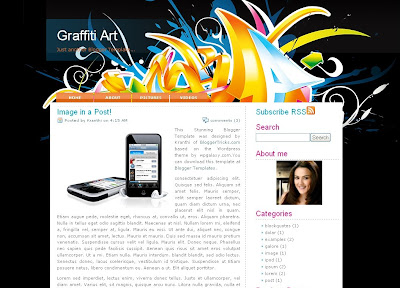
As you can see, the theme was very good looking with a Gorgeous 3D header image and lovely navigation links at the top and a nice sidebar.
This template was originally a WordPress theme by wpgalaxy.com.


NOTE:Due To Lack Of Bandwidth the images might not load properly on your blog plus the demo blog so plz. upload the images yourself for this read the following article ‘Manage Blogger Image Storage Space’

Installation Help:

1.First Install the template by following the instructions here.


2.Once you installed the template,you have the edit the top links

Go to ‘Edit html’ and scroll down the template code and find this piece of html code (hit Control+F to search)

Now, change the text(Home,About,etc) and add the respective links by Replacing the YOUR-LINK-HERE


3.And the final step is adding your Feedburner url

Find this code:

and Write your Feedburner url in the place of YOUR-FEEDBURNER-URL
and Save the changes!!

Leave A Comment If You Like This Template


Top 10 Search Terms:

• template blog 3D • template blogger 3d • 3d blogger templates • 3d blogger template • template 3d blogger • 3d templates for blogger • blogger template 3d • blogger 3d templates • 3d blog template • 3d template for blogger

A nice watch style blogger xml template for whome time matters. This cool blogger template is the best choice for people who like to plan everything and do it on time.

Download! | Demo!


Template name: Watch

Size: 25 kb


Type: New Blogger Template (XML)

4 Column, Fixed Width, Editable

Best quality (IE & Firefox) all Size and Resolutions


Do Read Our topic “Get-your-individual-post-date-stamp” to make the timestamp work properly!


iTheme Techno blogger template is the beautiful template with Mac OS interface design, drag & drop sidebar (we are the FIRST who use it for a blogger template!), and beautiful mini icons. Originally, this theme is designed by Nick La.

By downloading and using this template, you agree to the following terms:

  • You may NOT resell this theme
  • A link back to N.Design Studio and Magznetwork must be retained in the footer (either modified or unmodified)
  • You may use this theme for personal or commercial projects
  • You may modify, translate or distribute

Sidebar docking boxes (dbx) by Brothercake. Modified for Blogger by Blackquanta and Magznetwork

Please read the instruction carefully if you don’t want to get any problems.

INSTALLATION INSTRUCTION

  1. Download and extract the zip file.
  2. Login to your GooglePages and upload all of the images under /images folder
  3. Edit the XML file and replace http://YOURGOOGLEPAGES.googlepages.com with your Google account.
  4. Login to your Blogger Dashboard
  5. Go to Layout > Edit HTML
  6. Upload XML Template file (DO NOT copy and paste the code directly to template editor box)
  7. PLEASE DO NOT PREVIEW YOUR BLOG. Go to Layout > Page Element
  8. Edit “Top Menu” widget. Add at least one link, for example you can make a link to your blog homepage with “Home” anchor text
  9. Edit “Archives” widget. Chose “Flat List” Style and “MM YY” Date Format style, for example “February 2008″
  10. Edit “Recent Posts” widget. Change Feed URL to http://YOURBLOGNAME.blogspot.com/feeds/posts/default
  11. Edit “Recent Comments” widget. Change Feed URL to http://YOURBLOGNAME.blogspot.com/feeds/comments/default
  12. Go to Settings > Formatting, choose Timestamp style: “Wednesday, Januari 30, 2008″
  13. Finish. Preview your blog to see the result.

iTheme Techno (2 columns, right sidebar)

iTheme Techno (2 columns, right sidebar)

Live Demo

Download: iTheme Techno (2 columns, right sidebar)

iTheme Techno (2 columns, left sidebar)

iTheme Techno (2 columns, left sidebar)

Live Demo

Download: iTheme Techno (2 columns, left sidebar)

iTheme Techno (3 columns, right sidebars)

iTheme Techno (3 columns, right sidebars)

Live Demo

Download: iTheme Techno (3 columns, right sidebars)

iTheme Techno (3 columns, left & right sidebars)

iTheme Techno (3 columns, left & right sidebar)

Live Demo

Download: iTheme Techno (3 columns, left & right sidebars)

iTheme Techno (3 columns, left sidebars)

iTheme Techno (3 columns, left sidebars)

Live Demo

Download: iTheme Techno (3 columns, left sidebars)


Top 10 Search Terms:

• iTheme Techno Blogger Template • iTheme Techno Blogger • techno blogger template

This post contains Japanese Fleur Blogger Template. It’s a Very Beautiful blogger template. It’s a 2 Column blogger template.

A preview image


Download! | Demo!

123456789


whos.amung.us
