Cloaking your affiliate link is the practice of hiding your ugly affiliate URL link from your visitors. So instead of seeing “http://noteeboyz.massarticl.hop.clickbank.net/” they’ll see “www.yourdomain.com/recommends/productname” or whatever product you are promoting. Which is, I think we can agree is much more attractive URL to make people click!
Link cloaking is important not only because it will improve the amount of times your links get clicked (many internet users are skeptical of weird links with loads of numbers) but also, it helps prevent affiliate link theft. This is when a user sees your blatant affiliate link and thinks “hmm, I think I’ll just sign up as an affiliate and save myself 50% of the sale”.
Link theft is particularly rife in the make money/affiliate marketing niche. Of course, savvy marketers will also know it’s an affiliate link when they see yourdomain.com/something instead of linking directly to their website. But it isn’t AS obvious and in my experience it has increased conversions.
The easiest way to cloak your links
There’s a whole bunch of different ways to cloak your affiliate link’s. Some people have even set up businesses where they offer a link cloaking service. I recommend that you stay away from these as I have heard of several cases where the affiliates in question didn’t get the credit for a lot of sales.
I’m not going to point any fingers but I suspect some link theft is going on, or improper cloaking techniques are being utilized. Either way, I wouldn’t trust a third party (other than of course the affiliate network e.g. Clickbank) with such an important part of your business.
Also, I don’t understand why people use these services at all. Because cloaking your links couldn’t be simpler. All you need to do is create a simple PHP redirect. And of course, I’m going to show you how…
How to cloak your links step by step
For cloaking links you will obviously need your own server and knowledge on using any FTP program or you can use cPanel if you are more easy with it. And basically all we need to do to cloak our links is upload a tiny file (which I’ll show you how to create) to our website.
You’ll need to repeat this process for each website you create, but in total it takes like 2 minutes to do.
Step #1: Create a new folder on your desktop and name it recommends.
That will be the www.yourdomain.com/RECOMMENDS/product
part. Now, you don’t have to make ‘recommends’ all the time, you could name it ‘go’ for example. If I were creating a story website I might call this folder ‘go’ instead. “Recommends” is better suited to a
review page.
Step #2: Open the folder and inside create a text document.
Name this text document whatever you want the “product” part of the URL to be, but make sure it’s all one word (No spaces in the name). Often the product name or a shortened version of it is what I’ll use – but you can experiment if you like.
I just want to make this crystal clear (I’m not a techie myself, so I know how this can be tough)… Let’s say the folder was called go and the text document inside was called smartbloggerz. The cloaked link would look like this:
http://www.yourdomain.com/go/smartbloggerz.php
Step #3: Change the file extension of the text document to php.
So hit rename and on the end of the filename replace .txt with .php
IMPORTANT NOTE: You will need to enable file extensions if you can’t see the .txt part.
Here’s a guide on how to do that in Windows:
http://www.wikihow.com/Disable-Hidden-File-Extensions-in-Windows-XP
Or an alternative way could be that open the file in NotePad and then while saving it select “All Files” from the type selection and enter the file name as yourproduct.php
So far then, it should look like this:
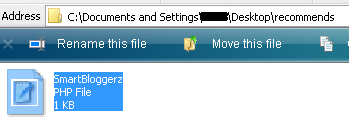
Step #4: This is where it gets kind of tricky (well I mean not really.. but anyway)…
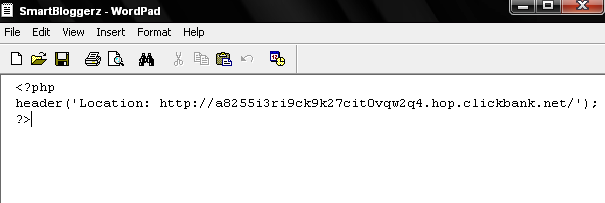
Open up your product.php in notepad and you’ll see a blank document. You need to enter this code, and nothing else inside it:
<?php
header(‘Location: affiliatelinkhere’);
?>
Just copy and paste that into the document and insert your affiliate link. Here’s exactly what the document should look like:
Ok, save that, now all we need to do is upload it to our web site server.
Step #5: Log into your FTP program or cPanel and browse to file where you saved it.
Step 6#: In your server “public_html”, if it’s your priary website then upload the folder there. The recommends folder should now be on your web server and you’re done.
By the way, make sure to test your link by actually typing in
www.yourdomain.com/recommends/productname.php
to make sure it works! You should go straight to the merchants website when you enter that.
Also, remember that that URL will be your affiliate link (because as users are redirected through that other page you’ll get credit for the sale). So whenever you want to add an affiliate link to your site, add that link and NOT plain the affiliate link.
I think that some marketers put off cloaking there links because it seems hard work and not really worth the trouble. But it is worth your time…There’s a reason that all the top affiliates do it. Because it does improve conversions.
You will want to do it sooner or later, and as I’ve just demonstrated to you, it really is a simple process that only takes a couple of minutes at the most.
Alright then! I’ve discussed everything you will ever need (or want) to know about cloaking your affiliate links easily. If you get any problem then just hit me a comment below.
So What about you? How do you cloak links? You use any plugin or use this same way? Well honestly I use sometimes plugins and sometime this method. But What about you? Eager to know…
Top 10 Search Terms:
• cloaking affiliate links • affiliate link cloaking • cloak affiliate links
Is it just me or has this been a really hot topic lately? I’ve seen many bloggers talking about masking urls etc even using third part “purchased” software to do so.
I normally state my opinion right away but I must admit I’m almost convinced it’s a good idea after reading so many articles saying it shoudl be done.
Perhaps I shoudl be re considering the masking of my own personal affiliate links. I guess we’ll see what time brings.
.-= bbrian017´s last blog ..Please vote for me over at Keller Hawthornes best blog contest 2009 =-.
I hope after masking your affiliate links it will bring better clicks and cash to you $$$
Yeah perhaps! I guess right now people just type in the url and visit the website manually which is not cool!
.-= bbrian017´s last blog ..Keep your eyes pealed as the blog engage blog is returning and better then ever =-.
Thanks for sharing this! I think I might have to try this out! :]
I would imagine this would also be a great way to track clicks on affiliate links yourself?
.-= Jeremiah Hoyet´s last blog ..How Can a Contest Help Your Blog? =-.
Ya you can also track links by placing some trackable affiliate link in the php file..
If you have a wordpress blog you can wp-affiliate for the your own cloaking of URLS. Greg Ellison
.-= Greg Ellison´s last blog ..Blog Income Report for August 2009 =-.
Yup, WordPress have many plugins for cloaking affiliate links but this method is best who are having review site i.e a Minisite or any other kind of website..
This is truly one of the easiest methods to cloak your links but at the end of the day I prefer to use GoCodes, a plugin for WordPress. The advantages of using it is that you can do everything directly from your WP-admin panel and you can track the number of clicks which you can use to estimate RPC.
.-= Stefan´s last blog ..Monthly Roundup – August 2009 =-.
@Stefan, Whoa, Go Code. This is gold dude. I’m just so lazy login into my FTP program and editing stuff…^-^
.-= Andi | Web Marketer Depot´s last blog ..How I Write SEO Optimize Article in 45 Minutes or Less =-.
Very easy to follow guide and I bookmarked this for future reference. I am just now getting into affiliate marketing and I definitely need to start doing this.
.-= Tycoon Blogger@Make Money Blogging´s last blog ..Top Commentator for August =-.
Thanks for bookmarking and I hope it will prove helpful whenever you start affiliate marketing to make money online.
You have suggest the better way to stop the link theft which is rife in internet marketing and you have made appropriate points to explain it.
Glad to see that you found this article useful and Thanks for commenting..
It’s better to cloak links and I’m using GoCodes to do just that. It’s very easy to use and setup and you can use the cloaked link anywhere.
.-= George Serradinho´s last blog ..Thesis Tutorial – 7 Tips to make your Blog Unique =-.
GoCodes is a really great plugin.. even like it after they introduced a new feature through which you can change the folder name from “go” to your own..
Wow I always wonder how peole got to do this. I don’t have any affiliates to cloak but I find your article very interesting.
Michael
.-= MichaelR@VoIP and Tech Blog´s last blog ..All About the V Thing =-.
I think you got the answer how people cloak their affiliate links..Make sure you try it to enjoy the fun of doing it..
I’ve been using this way to cloak my affiliate links for months and I found it quite useful, this increases the click through rate as well. I believe that people who serious about affiliate marketing should get the Ninja Affiliate plugin?
Regards,
Lee
.-= Lee Ka Hoong´s last blog ..Professional Web Graphic Banner Design =-.
Ya, but Ninja Affiliate plugin is for only wordpress blogs..It won’t work on a Minisite or a review page..
Nice guide..I have been using this method…It is useful for those who can’t afford to buy premium cloak link plugin such as Ninja Affiliate Plugin..
.-= Een Rockstar´s last blog ..Do You Really Need to Setup a Blogging System? =-.
If you are using WordPress blogs and can’t afford to have Ninja Plugin then you go for other plugin which are free like GoCodes Plugin..