This is seriously an awesome looking blogger template specially for music lover blogs. This template has been designed and coded by EZwpthemes and Bloggerized by FalconHive. This is a 2 column template with lots of exciting and attractive colors and graphics.
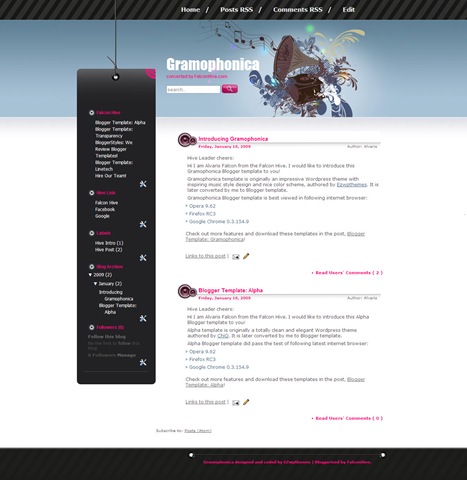
NOTE: Before using this template it is recommended to upload the images present in the download file to your own host so as you don’t get any bandwidth related problems.
Do it Yourself!
Step1. Set up the Header Navigation Bar
You can customize your header navigation link to your own preferred link. To achieve this, access into ‘Layout’ and under the ‘Edit HTML’ tab, press [CTRL+F in Firefox Browser] to find the code below and change the red highlighted code to your link.
<li><a href='#' title='#'>Edit</a></li>
Step2. Set up the RSS Subscribe button
You can probably see a pinkish RSS icon on the top of the left sidebar, which you can personalize the RSS to your own personal RSS address. To get this done, access into ‘Layout’ and under the ‘Edit HTML’ tab, press [CTRL+F in Firefox Browser] to find the code below, remove ‘expr:’ and replace the red highlighted text with your own RSS address.
<div id='rss'>
<a expr:href='data:blog.homepageUrl + "feeds/posts/default"'>
<img src='http://i36.photobucket.com/albums/e2/alvaris924/Gramphonica%20Project/nav-spacer.gif' width='28px' height='28px' alt='' /></a>
</div>
I have confidence that you will be able to do the above things properly. If you have any problem then you may consult the original converter of this template i.e Alvaris Falcon :{)
So how is this template? Do you like it?
Hey…
I see a demo, very seriously, especially when used enamor blog for musical
Regard
I’m liking it, just tweaking it and hosting the images on my own Photobucket account.
Hi, thanks for introducing Gramophonica! I really appreciated this and a detailed article indeed!
Hello Smart Bloggerz,
I have a question: http://bloggertricks.com convert the template Blackberry from WP to Blogger but I see a problem with the block: POST CONTENT (the comment content too) who is too on the right. What is wrong with the code ?
Here the Bloggertricks DEMO:
http://blackberry-template.blogspot.com/
And here the WP template:
http://test.qualitywordpress.com/?preview_theme=blackberry
What’s wrong with the blogger code that is to on the right ?
Can you help me? – I need your “Smartness” …
Thanks
Steve
Why you post like an Anonymous??
And why you posted on irregular post..Can’t you ask the orignal converter itself..I am not sharing that template on my blog..
But still..Lemme tell you. It’s just due to slight increase in width size of “#content .post .post-info” and “#content .post .post-entry” which is in the CSS part of the template; due to which the post and the comment section is appearing to the right..
Upss sorry TYPHONN …
Thanks for your anwer
1.- I ask to ne guy who convert this template but he didn’t answer to me.
2.- I saw your nick SMART … so I was thinking that u can help me.
… I was just this.
Sorry
RZL
No Problem 🙂