WordPress is one of the popular blogging platform which offers almost full control on our blog. Due to this, most of us use our wordpress blog to its extreme limits by activating many plugins, using various kind of widgets, high quality design which thus results into slower loading time of the blog.
As you might be aware that Google recently included site speed as a factor for ranking websites thus it becomes important to optimize our wordpress blog speed not only to have the chance to get better rankings with that new signal but also to improve our readers experience and also to improve bounce rate. Because, if your blog is gonna be slow then people will look forward to fly off your blog.

In this post, I will guide you through 3 simple steps which I have also used to speed up wordpress blog.
Step1. Install The New Best Caching Plugin
From the start of wordpress blog speed optimizing trend, most of us were told and used WP Super Cache for serving cached pages to increase the blog speed. But from past half year or so, there is a new leader in this department and which I think is 10 times better than WP Super Cache and its name is W3 Total Cache.
As your first step to speed your wordpress blog, Install W3 Total Cache plugin which I think is very simple to do like any other plugin installation and then activate it.
With the plugin alone, you will see a faster version of your blog. But wait a second and keep reading to make it more faster.
Step2. Buy A CDN Service
As a next step to speed up wordpress blog, you need to buy a CDN service.
In simple language, CDN stands for Content Delivery Network which is a network of highly optimized servers that are spread all over the world to serve your blog to the user based on its geographical location and the nearest server to that place.
Using a CDN might sound strange if you are having a small blog and may also appear costly but it is not really the case. Right now, even small and mid-size blog should try to look over a CDN service to distribute the blog to the user. But many times, they aren’t able to do so due to costly prices of getting a CDN service.
But not anymore!
MaxCDN has brought a Limited-Time Special Offer with which you can get their CDN service for just $10/mo $39.95(offer price has been increased now) in which you get 1 TB = 1024 GB of bandwith. Now if you are a small or mid size blog then that cost and the amount of bandwith being offered is more than enough looking at the average requirements.

So, as your second step to speed up wordpress blog, you need to Click Here And Buy Max CDN service.
Step3. Integrate CDN With Your Blog
Now in the final step to speed up wordpress blog, you need integrate MaxCDN with your blog.
For making this happen, log into your Max CDN dashboard and Click on Manage Zones from the upper tabs.
Next, click on the “Create Pull Zones” option from that page and fill the information as shown in the below screenshot:

After you have clicked on the “Create Button”, note down your temporary URL. In my case, it was – blog.smartbloggerz.netdna-cdn.com
As the final process, you need to copy this URL and log into your wordpress dashboard. Assuming that you have installed W3 Total Cache plugin; click on the settings tab of W3 Total cache. Make sure that CDN settings is enabled from the “General Settings” tab.
Then go to CDN settings and under Configuration segment you will see a blank box pointed by the text “Replace site’s hostname with:”. In that box, paste your temporary URL which you copied on the creation of Pull Zone and click on “Save Changes”. Yes, only this much. Nothing else.

Once you have done that, you will definitely see a faster loading blog which is being served by a CDN network.
Will That Make The Blog Really Fast?
According to me, CDN along with W3 Total Cache really improves the loading time and speeds up serving multimedia files. I am using MaxCDN service from almost a month now and it has really improved the overall speed of the blog.
Now people can download and watch videos at faster speed. For example, at normal conditions I get a Download speed of 20 KB/sec but whenever I download or watch any videos that is being served from a CDN network, I get superb speeds which is 100’s times faster than my normal speed.
Here is a screenshot of a video being downloaded to my PC hosted on my blog and served from my CDN:
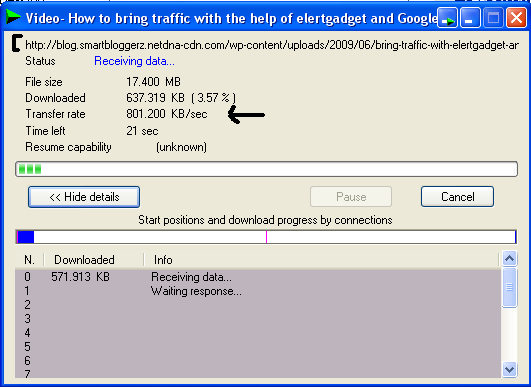
Did you see that speed? Isn’t it amazing? That’s why I recommend using a CDN service like MaxCDN with W3 Total Cache plugin to speed up wordpress blog.
Conclusion
If you are using wordpress platform then I definitely recommend you using a CDN network along with W3 total Cache plugin to speed up wordpress blog so that your readers can easily read your blog articles and which could then also help in improving your Google rankings considering the new site speed factor introduced by Google in their ranking algorithm.
So are you using any caching plugin? Is it W3 Total Cache or something else? Also, are using CDN service or thinking to use it? Let me know your opinion on this post by commenting below.
Top 10 Search Terms:
• speed up wordpress dashboard
It must work really well for you, your blog mas amazing pageload times of under 2 seconds and loads 3x faster than my blog. I know that WP-SuperCache can cause issues with many hosting providers and actually slow down a blog due to memory usage increase of “caching” pages, but hosting the content on an external network should be faster and spare bandwidth from your own site. Does MaxDN do a full scan of your site and load in all content to serve it from its own cache?
.-= Dragon Blogger´s last blog ..Tips for Bloggers: Establish Your Blogging Reputation =-.
Yup, it takes all the files in the upload folder, theme files and root files like included in wp-includes and serves it from its own network automatically…But do remember that it does not take the files from the plugins folder as that is served in real time from your server.
Yes…W3 Total Cache is superior than wp super cache!
i just cant get the minify works with my host configuration…
as alternative, i minify js and css using wp-minify
.-= el7cosmos@eL Abee´s last blog ..7 Video Minggu Ini: April Minggu 3 =-.
Exactly..WP super cache from past many updates showed lack of development in its plugin and on the other hand W3 Total Cache came up with a bang with so many features and options for blog owners to select..Due to same thing, WP super cache is now becoming less popular.
I’m not sure about CDN, but I’ll be installing the plugin. 🙂
.-= Dennis Edell @ Direct Sales Marketing´s last blog ..New Updated Long Detailed Comment Policy Coming very SOON! Among Others… =-.
Yup sure..Do let me know the changes you experience.
this method involves bit of cash which i am currently short of….i have bookmarked this page and will return to this later
.-= Tushar´s last blog ..How You Can Make Money Blogging? =-.
But you can obviously try the first step which will make the blog load faster free of cost. The further steps can be used to make it lightning fast 🙂
By the way, Which plugin you are using right now for caching?
thanks for the info sushant 🙂
installing the w3total cache plugin !!
.-= Dev | Technshare´s last blog ..Twitter Launches ‘Promoted Tweets’ to Make Money =-.
No problem..Let me know your experience using it on your blog.
Wow! its cool. I’ll apply these steps on my new wordpress blog. Thanks for sharing such informative and useful post.
Thanks James for commenting..I hope your new wordpress blog will be faster from its starting 🙂
This is cool. In my country, a lot of people asking about CDN which they are totally don’t have an idea about it. Big website like youtube, facebook use CDN service. Me too have thought to use CDN service for my blog but I have to check the offer out first. Thanks for the info
Yes, It’s not only better for the search engine but also better in attracting more traffic. readers usually does not wait for pages to load. If they get tired, they will just move on and go to another site. The problem is, will the step work on a site that has a lot of contents and a lot traffic. i hope it will, because i see a lot of top sites that takes too long to load.
.-= Dennis Smith´s last blog ..Global Royalties Member: Martha Louise, Princess of Norway =-.
Thanks for this quick tips.
I was searching a bit more, and yesterday I have installed another cache plugin “Hyper Cache” due to the comparison from Tutorial9 website. I was using W3 Total and this Hyper Cache seems to me easier to set.
Maybe it can help you with your decision:
http://www.tutorial9.net/web-tutorials/wordpress-caching-whats-the-best-caching-plugin/
(acording to the test this plugin has won in % measurement but W3 offers more, I guess)
Regards,
Jan “DJ Tukancheez”
You’re using the EXACT same set up as me lol. I have W3 Total Cache and a CDN service from MaxCDN. From within Google Webmaster tools I’m still getting page load times of like 4 seconds though which according to Google is still slow… what else do you think I can do?
.-= Chris@Money Making Ideas´s last blog ..Cash Crate Review =-.
Hey Chris, nice to know that…By the way the meaning of that statement by Google in your webmaster account means that your blog is XX% slower from the other websites you have added into your account..not from the entire world..
So, in your webmaster account, you might be having some affiliate blogs which might be loading up fast due to lesser amount of scripts, images etc.